Rigid bodies and joints
Notebook python/Notebooks/tutorialRigidBody.ipynb - the same model with the Create functions is
python/Notebooks/tutorialRigidBodyCreate.ipynb.
A double pendulum in 3D: two rigid bodies, the first attached to the ground with a revolute joint about \(z\), the
second to the first with a revolute joint about \(x\), under gravity. The joints are built from markers and
joint objects, which shows what the Create functions do and works for any kind of body, also flexible ones; the
outputs below each cell are those of the last run.
import exudyn as exu
from exudyn.utilities import InertiaCuboid, MarkerBodyRigid, GenericJoint, VObjectJointGeneric, \
                             ObjectJointRevoluteZ, VObjectJointRevoluteZ, SensorBody, RotationMatrixX, RotationMatrixY
from exudyn.interactive import ShowImage
import exudyn.graphics as graphics
import numpy as np

SC = exu.SystemContainer()
mbs = SC.AddSystem()

g = [0,-9.81,0]     #gravity
L = 1               #length
w = 0.1             #width
oGround = mbs.CreateGround(graphicsDataList=[graphics.CheckerBoard(point=[0.5,-1.6,0], normal=[0,1,0], size=3)])
The first link, a rigid body with its center of mass moved by \(-L/4\) along its axis; CreateRigidBody adds a node, a
body and its gravity load. Its frame is at \([L/2,0,0]\), given as homogeneous transformation exu.HT.
iCube0 = InertiaCuboid(density=5000, sideLengths=[L,w,w]).Translated([-0.25*L,0,0])
graphicsBody0 = graphics.RigidLink(p0=[-0.5*L,0,0], p1=[0.5*L,0,0], axis0=[0,0,1], axis1=[0,0,0],
                                   radius=[0.5*w,0.5*w], thickness=w, width=[1.2*w,1.2*w], color=graphics.color.red)
b0 = mbs.CreateRigidBody(inertia=iCube0, referenceHT=exu.HT(translation=[0.5*L,0,0]), gravity=g,
                         graphicsDataList=[graphics.Basis(origin=iCube0.com, length=2*w), graphicsBody0])
A joint connects two markers, here two rigid body markers: on the ground at \([0,0,0]\) and on the body at its left
end. The joint axes are those of the markers’ frames; a marker turns its frame by its localHT.
Option 1 is the GenericJoint, which defines any joint with translations and rotations fixed or free - here all
but the rotation about \(z\). Option 2 is ObjectJointRevoluteZ, a free rotation about the local \(z\)-axis of
marker 0; any other axis is chosen by the rotation of the markers’ localHT, e.g.
MarkerBodyRigid(bodyNumber=b0, localHT=exu.HT().SetRotationY(0.5*np.pi)).
markerGround = mbs.AddMarker(MarkerBodyRigid(bodyNumber=oGround, localPosition=[0,0,0]))
markerBody0J0 = mbs.AddMarker(MarkerBodyRigid(bodyNumber=b0, localPosition=[-0.5*L,0,0]))

#option 1:
oJoint0 = mbs.AddObject(GenericJoint(markerNumbers=[markerGround, markerBody0J0], constrainedAxes=[1,1,1,1,1,0],
                                     visualization=VObjectJointGeneric(axesRadius=0.2*w, axesLength=1.4*w)))
#option 2, the same joint:
#oJoint0 = mbs.AddObject(ObjectJointRevoluteZ(markerNumbers=[markerGround, markerBody0J0],
#                                             visualization=VObjectJointRevoluteZ(axisRadius=0.2*w, axisLength=1.4*w)))
A wrong marker position shows in the render window: with localPosition=[-0.4*L,0,0], the two parts of the joint
would be drawn 0.1*L apart.
The second link and its joint about \(x\), again from two markers; the generic joint leaves the rotation about \(x\) free:
graphicsBody1 = graphics.RigidLink(p0=[0,0,-0.5*L], p1=[0,0,0.5*L], axis0=[1,0,0], axis1=[0,0,0],
                                   radius=[0.06,0.05], thickness=0.1, width=[0.12,0.12], color=graphics.color.lightgreen)
b1 = mbs.CreateRigidBody(inertia=InertiaCuboid(density=5000, sideLengths=[0.1,0.1,1]),
                         referenceHT=exu.HT(translation=[L,0,0.5*L]), gravity=g, graphicsDataList=[graphicsBody1])

markerBody0J1 = mbs.AddMarker(MarkerBodyRigid(bodyNumber=b0, localPosition=[0.5*L,0,0]))
markerBody1J0 = mbs.AddMarker(MarkerBodyRigid(bodyNumber=b1, localPosition=[0,0,-0.5*L]))
oJoint1 = mbs.AddObject(GenericJoint(markerNumbers=[markerBody0J1, markerBody1J0], constrainedAxes=[1,1,1,0,1,1],
                                     visualization=VObjectJointGeneric(axesRadius=0.2*w, axesLength=1.4*w)))

sens1 = mbs.AddSensor(SensorBody(bodyNumber=b1, localPosition=[0,0,0.5*L], storeInternal=True,
                                 outputVariableType=exu.OutputVariableType.Position))
mbs.Assemble()
dof = mbs.ComputeSystemDegreeOfFreedom(verbose=True)
ODE2 coordinates          = 14
total constraints         = 14
redundant constraints     = 0
pure algebraic constraints= 2
degree of freedom         = 2
The model in its reference configuration, with the joint axes:
SC.visualizationSettings.nodes.show = False
SC.visualizationSettings.loads.show = False
SC.visualizationSettings.connectors.showJointAxes = True
SC.visualizationSettings.general.showSolverInformation = False
view = RotationMatrixX(-0.4) @ RotationMatrixY(-0.5)
image = ShowImage(SC, size=[1280,960], modelRotation=view)
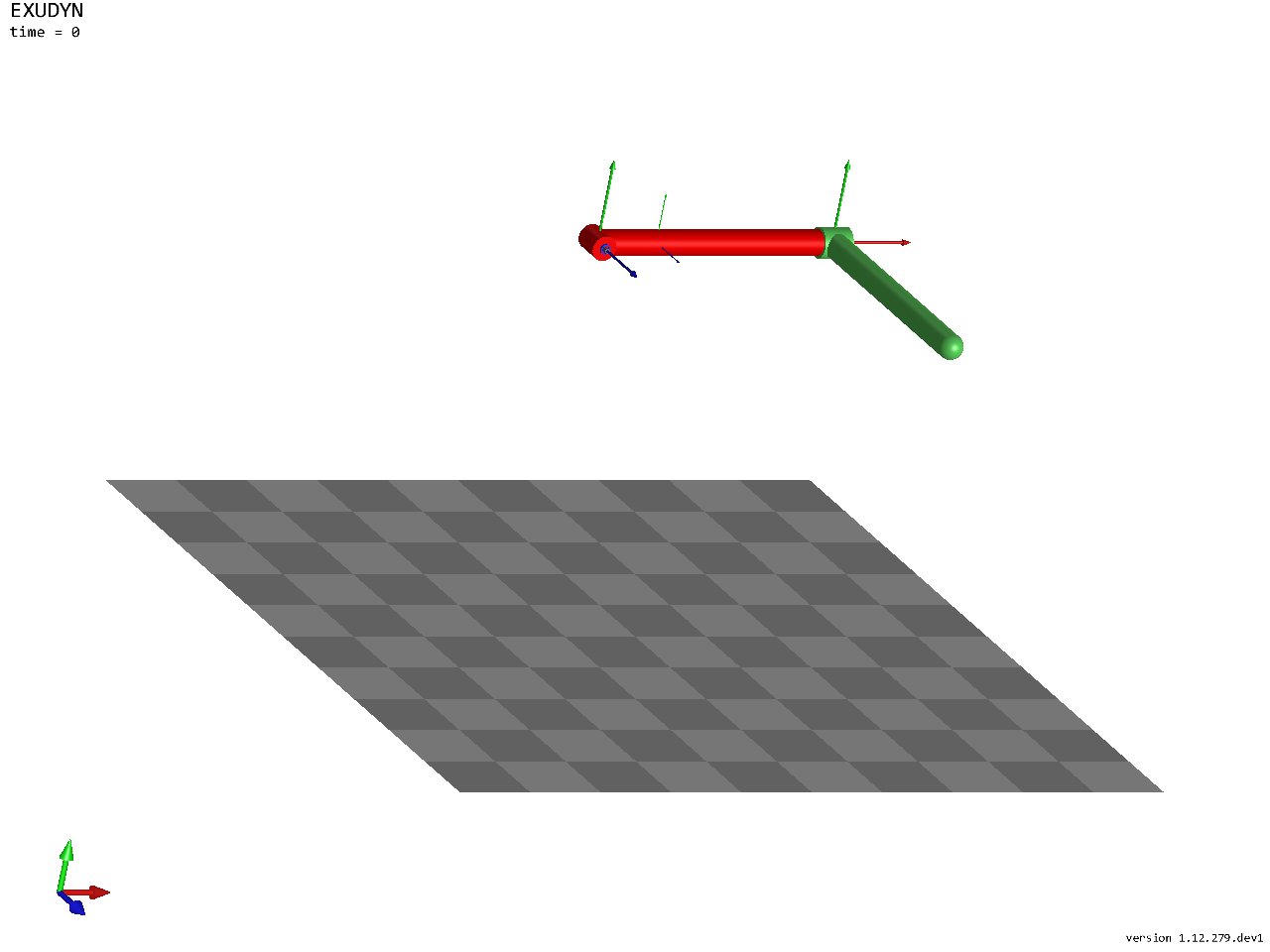
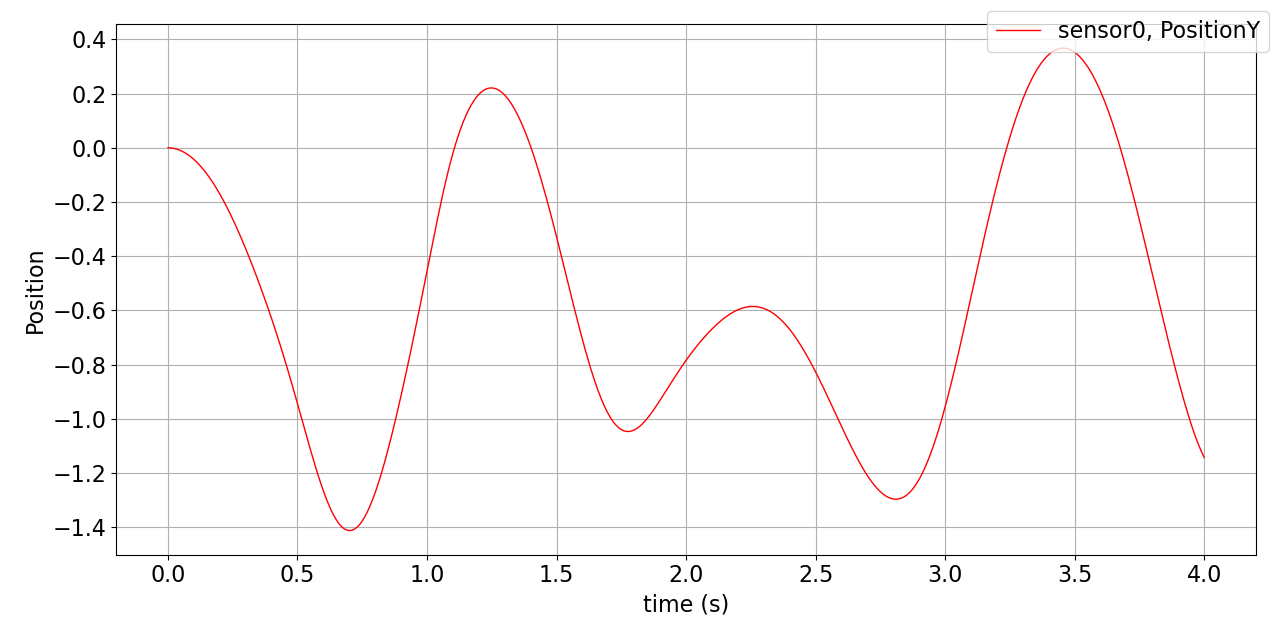
Four seconds with the index 2 trapezoidal rule, and the tip position over time:
tEnd = 4
h = 1e-3
simulationSettings = exu.SimulationSettings()
simulationSettings.timeIntegration.numberOfSteps = int(tEnd/h)
simulationSettings.timeIntegration.endTime = tEnd
simulationSettings.solution.file.writePeriod = 0.005

mbs.SolveDynamic(simulationSettings=simulationSettings, solverType=exu.DynamicSolverType.TrapezoidalIndex2)
mbs.PlotSensor(sensorNumbers=[sens1], components=[1], closeAll=True)
In a script, mbs.SolutionViewer() shows the stored motion forward and backward in the render window.