Mass-spring-damper
Notebook python/Notebooks/tutorialSpringDamper.ipynb - the same model with the Create functions is
python/Notebooks/tutorialSpringDamperCreate.ipynb.
The first tutorial sets up a mass point and a spring-damper, computes the solution dynamically and compares it with the exact solution. It builds the model from its items - nodes, objects, markers, loads and sensors -, which shows how Exudyn works inside; the outputs below each cell are those of the last run.
We import the Exudyn library and the items we need:
import exudyn as exu
from exudyn.utilities import Point, NodePointGround, MassPoint, VMassPoint, MarkerNodeCoordinate, \
                             CoordinateSpringDamper, LoadCoordinate, SensorObject, SensorNode
from exudyn.interactive import ShowImage
import exudyn.graphics as graphics
import numpy as np #for postprocessing
Instead of the named import of exudyn.utilities functions and classes, you can use a star import,
from exudyn.utilities import *, which includes itemInterface, rigidBodyUtilities and some helper functions.
Next, we need a SystemContainer, which contains all computable systems, and add a new MainSystem mbs.
Name your system mbs (multibody system) always, in order to copy and paste code parts from other examples,
tutorials and projects:
SC = exu.SystemContainer()
mbs = SC.AddSystem()
The version is in line with the issue tracker and counts its resolved issues; exu.config.Version(True) adds
platform-specific information, which helps when reporting a compatibility issue:
print('EXUDYN version='+exu.config.Version())
EXUDYN version=1.12.279.dev1
Using the Python language, we define the parameters of our problem, which we will also use for the analytical solution, and the initial displacement and velocity of the mass:
L = 0.5             #reference position of mass
mass = 1.6          #mass in kg
spring = 4000       #stiffness of spring-damper in N/m
damper = 8          #damping constant in N/(m/s)
f = 80              #force on mass

u0 = -0.08          #initial displacement
v0 = 1              #initial velocity
x0 = f/spring       #static displacement
print('resonance frequency = '+str(np.sqrt(spring/mass)))
print('static displacement = '+str(x0))
resonance frequency = 50.0
static displacement = 0.02
We first need to add nodes, which provide the coordinates (and the degrees of freedom) to the system. The
following line adds a 3D node for a 3D mass point; Point is an abbreviation of NodePoint. Its arguments are
referenceCoordinates, the coordinates for which the system is defined; the initial configuration is
referenceCoordinates + initialCoordinates, and the initial state additionally gets initialVelocities.
mbs.AddNode(...) returns a NodeIndex, which can only be used as node number - in an object or in a marker.
While Point adds 3 unknown coordinates to the system, a ground node has no unknown coordinates - and no initial
displacements or velocities; ground nodes (and ground bodies) need no constraints to be fixed:
n1 = mbs.AddNode(Point(referenceCoordinates = [L,0,0],
                       initialCoordinates = [u0,0,0],
                       initialVelocities = [v0,0,0]))
nGround = mbs.AddNode(NodePointGround(referenceCoordinates = [0,0,0]))
Next, an object, which provides the equations for the coordinates. Objects depend on one or more nodes - bodies
and finite elements - or connect (the coordinates of) objects via markers - the connectors, see
the module structure. The MassPoint needs at least a mass (kg) and a node number;
graphics can be attached:
massPoint = mbs.AddObject(MassPoint(mass = mass, nodeNumber = n1,
                                    visualization=VMassPoint(graphicsData=[graphics.Sphere(radius=0.04,
                                                                           color=graphics.color.red)])))
Constraints and loads need markers: positions or frames, or - as here - coordinates of nodes, on which a connector or a load acts. Markers are attached to the ground node and to the node of the mass, using a coordinate number (0 is the first coordinate):
groundMarker = mbs.AddMarker(MarkerNodeCoordinate(nodeNumber = nGround, coordinate = 0))
#marker for springDamper for first (x-)coordinate:
nodeMarker = mbs.AddMarker(MarkerNodeCoordinate(nodeNumber = n1, coordinate = 0))
The spring-damper between the two markers, with stiffness and damping, and a load on the marker of the node, a
scalar load f on its coordinate:
nC = mbs.AddObject(CoordinateSpringDamper(markerNumbers = [groundMarker, nodeMarker],
                                          stiffness = spring,
                                          damping = damper))
nLoad = mbs.AddLoad(LoadCoordinate(markerNumber = nodeMarker, load = f))
Finally, sensors: the force of the spring-damper and the displacement of the node. Sensors can be attached to
nodes, bodies, objects (connectors) and loads; with storeInternal=True they keep their values in memory instead
of writing a file:
sForce = mbs.AddSensor(SensorObject(objectNumber=nC, storeInternal=True,
                                    outputVariableType=exu.OutputVariableType.Force))
sDisp = mbs.AddSensor(SensorNode(nodeNumber=n1, storeInternal=True,
                                 outputVariableType=exu.OutputVariableType.Displacement))
The system is complete: we print its information and assemble it, which makes it ready for the simulation.
print(mbs)     #show system properties
mbs.Assemble() #prepare for simulation
<systemData:
  Number of nodes= 2
  Number of objects = 2
  Number of markers = 2
  Number of loads = 1
  Number of sensors = 2
  Number of ODE2 coordinates = 0
  Number of ODE1 coordinates = 0
  Number of AE coordinates   = 0
  Number of data coordinates   = 0

For details see mbs.systemData, mbs.sys and mbs.variables
>
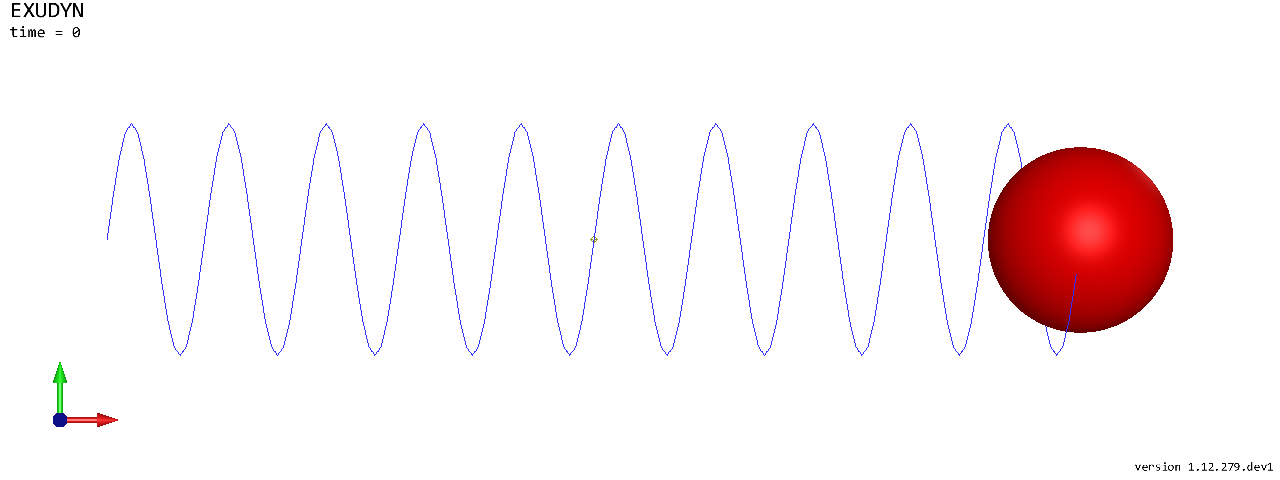
The model, as the renderer draws it; in a notebook as an image of the raytracer, without a window. A script would
call SC.renderer.Start() before the simulation and SC.renderer.Stop() after it, and see the motion:
SC.visualizationSettings.general.showSolverInformation = False
SC.visualizationSettings.connectors.springNumberOfWindings = 10
image = ShowImage(SC, size=[1280,480])
We use time integration with a fixed step size and define the number of steps and the end time. All settings of a
simulation are in a structure given by exu.SimulationSettings(), which holds the default values; only the values
that differ need to be set. verboseMode = 1 shows some solver output:
tEnd = 1     #end time of simulation
h = 0.001    #step size; leads to 1000 steps

simulationSettings = exu.SimulationSettings()
simulationSettings.solution.file.writePeriod = 5e-3      #output interval general
simulationSettings.solution.sensors.writePeriod = 5e-3   #output interval of sensors
simulationSettings.timeIntegration.numberOfSteps = int(tEnd/h)
simulationSettings.timeIntegration.endTime = tEnd
simulationSettings.timeIntegration.verboseMode = 1
We use the generalized-\(\alpha\) solver, the default; its numerical damping is needed for index 3 constraints. With only spring-dampers, the spectral radius can be 1 - no numerical damping:
simulationSettings.timeIntegration.generalizedAlpha.spectralRadius = 1
mbs.SolveDynamic(simulationSettings)
+++++++++++++++++++++++++++++++
EXUDYN V1.12.279.dev1 solver: implicit second order time integration
STEP1000, t = 1s, timeToGo = 0s, Nit/step = 1
Solver terminated successfully after 0.0012072 seconds.
True
The simulation takes a few milliseconds. The final (current) position of the node:
u = mbs.GetNodeOutput(n1, exu.OutputVariableType.Position)
print('displacement=', u)
displacement= [0.51183493 0. 0. ]
The exact solution of the damped oscillator, \(x(t) = e^{-\omega_0 D t}\left(C_1 \cos(\omega t) + C_2 \sin(\omega t)\right) + x_0\) with \(\omega_0 = \sqrt{k/m}\), \(D = d/(2\sqrt{k m})\) and \(\omega = \omega_0\sqrt{1-D^2}\), as a matrix whose first column is the time, as the sensors store their values:
omega0 = np.sqrt(spring/mass)          #eigen frequency of undamped system
dRel = damper/(2*np.sqrt(spring*mass)) #dimensionless damping
omega = omega0*np.sqrt(1-dRel**2)      #eigen freq of damped system
C1 = u0-x0                             #static solution needs to be considered!
C2 = (v0+omega0*dRel*C1) / omega       #C1, C2 are coeffs for solution
t = np.linspace(0, tEnd, int(tEnd/h)+1)
refSol = np.column_stack((t, np.exp(-omega0*dRel*t)*(C1*np.cos(omega*t)+C2*np.sin(omega*t))+x0))
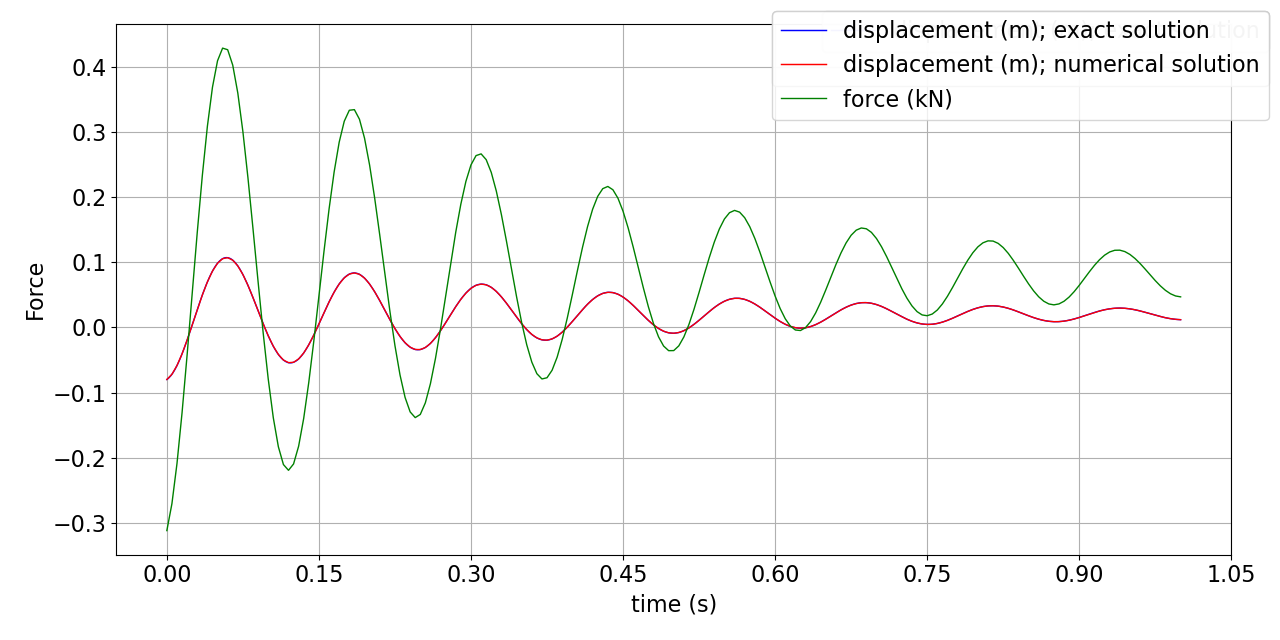
PlotSensor plots sensors and such matrices: the exact and the numerical displacement, and the force of the
spring-damper in kN. The coordinates do not include the reference position (0.5 here), see
coordinates:
mbs.PlotSensor(sensorNumbers=[refSol], components=[0], labels=['displacement (m); exact solution'],
               colorCodeOffset=2, closeAll=True)
mbs.PlotSensor(sensorNumbers=[sDisp], components=[0], labels=['displacement (m); numerical solution'],
               colorCodeOffset=0, newFigure=False)
mbs.PlotSensor(sensorNumbers=[sForce], components=[0], labels=['force (kN)'], factors=[1e-3],
               colorCodeOffset=1, newFigure=False)
The whole solution was also written to solution/coordinatesSolution.txt; in a script, mbs.SolutionViewer()
shows it forward and backward in the render window.